
10 new audit tests: security, privacy, SEO & accessibility
Orilyt goes from 47 to 57 tests — with a special focus on Google Fonts and privacy.
- Orilyt now runs 57 automated tests — 10 more than before, covering critical blind spots
- Google Fonts loading is now flagged for both GDPR compliance and performance impact
- New tests span 4 categories: security, SEO, legal/privacy, and user experience
When we launched Orilyt, the audit engine ran 47 tests. That was already comprehensive — performance, security, SEO, UX and legal compliance were all covered.
But the web evolves fast. New privacy regulations, new attack vectors, new best practices. Staying at 47 meant leaving gaps that clients would notice.
Today, Orilyt runs 57 tests. Here are the 10 new checks we added — and why each one matters.
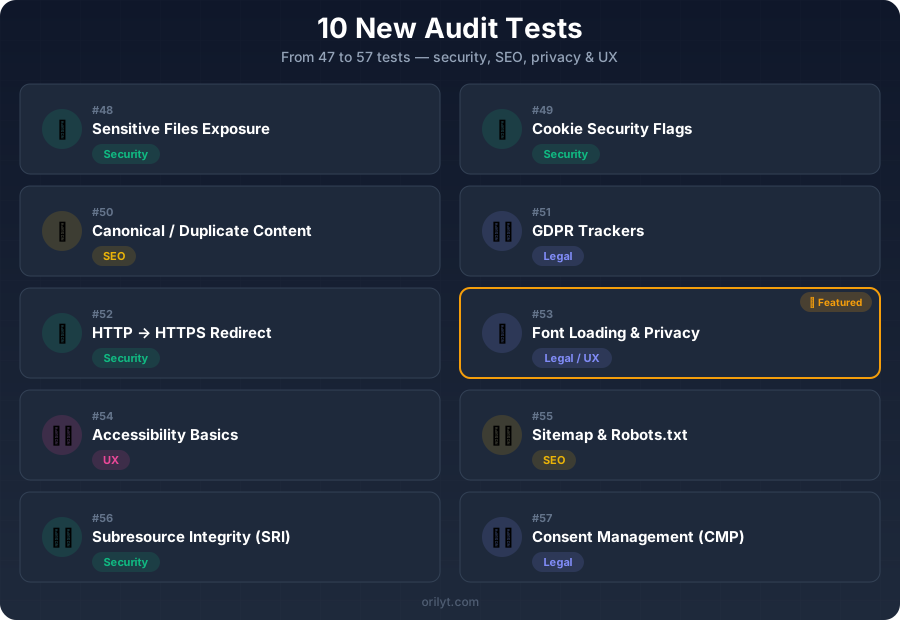
The 10 new tests at a glance
Checks for publicly accessible files that should never be exposed: .env, .git/config, wp-config backups, database dumps, debug logs. A single exposed file can leak credentials, API keys, or database passwords.
Verifies that cookies are set with Secure, HttpOnly and SameSite flags. Missing flags expose users to session hijacking, XSS-based theft and cross-site request forgery.
Detects missing or misconfigured canonical tags that cause search engines to index multiple versions of the same page. Duplicate content dilutes ranking signals and wastes crawl budget.
Scans for third-party trackers that load before user consent: Google Analytics, Facebook Pixel, advertising scripts. Loading trackers without consent violates GDPR and can trigger fines up to 4% of annual revenue.
Verifies that HTTP requests are properly redirected to HTTPS. A missing redirect means some visitors access the site over an unencrypted connection, exposing data in transit.
Detects whether the site loads fonts from Google's CDN (fonts.googleapis.com), which transfers visitor IP addresses to Google without consent. Also measures the performance impact of remote font loading.
Checks essential WCAG compliance: lang attribute on HTML, skip navigation links, form labels, ARIA landmarks, and focus indicators. These are the minimum requirements for users with disabilities.
Validates that an XML sitemap exists and is referenced in robots.txt, that robots.txt doesn't accidentally block important pages, and that the sitemap contains valid URLs.
Checks whether external scripts and stylesheets use integrity attributes. Without SRI, a compromised CDN could inject malicious code into your site without detection.
Detects whether a cookie consent banner or CMP (Consent Management Platform) is implemented. Without one, any site using cookies or trackers is non-compliant with GDPR, ePrivacy, and similar regulations.
Focus: why Google Fonts is a privacy and performance issue
Of the 10 new tests, #53 deserves special attention. Google Fonts is used on over 50 million websites. Most developers see it as harmless — just a stylesheet link. But there are two serious problems.
The privacy problem
When a visitor loads a page that uses Google Fonts via the CDN, their browser sends a request to fonts.googleapis.com. That request includes their IP address, user agent, referrer, and other metadata.
Since then, thousands of similar complaints have been filed across Europe. The ruling is clear: loading any resource from Google's servers without consent is a data transfer to a third party.
The performance problem
Remote font loading adds DNS lookups, TLS handshakes, and render-blocking requests. On mobile connections, this can delay First Contentful Paint by 200-500ms.
Self-hosting fonts eliminates these external requests and lets you control caching, subsetting, and font-display strategy.
How to fix it
The solution is straightforward: download the font files, host them on your own server, and reference them with local @font-face declarations. Tools like google-webfonts-helper make this easy.
Orilyt's test #53 detects Google Fonts CDN usage and flags it with both a privacy warning and a performance recommendation.
What this means for freelancers and agencies
- If you audit client websites, these 10 new tests give you more ammunition. Privacy issues like Google Fonts or missing consent banners are concrete, actionable findings that clients understand immediately.
- Security gaps like exposed .env files or missing cookie flags are not theoretical — they are real vulnerabilities that can be exploited today.
- And SEO issues like duplicate content or misconfigured sitemaps directly impact search rankings — something every client cares about.
- With 57 tests, an Orilyt audit now covers more ground than most manual checklists. That means less time auditing, more time advising.
From 47 to 57: every test has a reason
We didn't add these tests for the number. Each one addresses a real gap we identified through auditing hundreds of websites.
Privacy is no longer optional. Security basics are still being missed. SEO fundamentals are still broken on production sites. And accessibility is still an afterthought.
These 10 tests help you catch what others miss — and present it in a way your clients can act on.