

Orilyt is not just a WordPress tool: it audits every kind of website
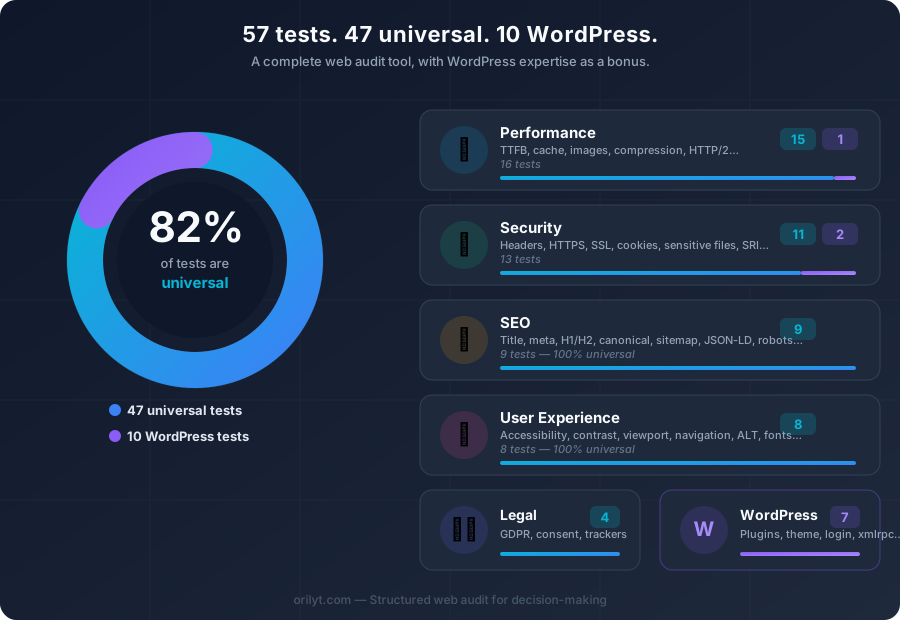
Orilyt is a complete web audit tool — with WordPress expertise as a bonus.
- Most of Orilyt's tests work on any website, regardless of the CMS
- Performance, security, SEO, UX and compliance: all universal pillars are covered
- WordPress-specific tests only activate when the CMS is detected
When people talk about Orilyt, the first association is often immediate: WordPress audit.
That's true. Orilyt was designed with WordPress in mind. But reducing Orilyt to a WordPress tool means missing the essential point.
Most of the tests that make up an Orilyt audit are completely CMS-independent. They work just as well on a Symfony site, a Laravel app, a Shopify store, a Webflow page, a Wix site, or a static HTML site.
And it is precisely these universal tests that cover the most critical topics.
What "read-only" really means
Orilyt analyzes a site from the outside. No plugin. No admin access. Just a URL.
This approach relies on analyzing HTTP responses, HTML, headers, loaded resources and public APIs.
Any website returns HTTP responses, serves HTML, loads images, CSS and JavaScript. It is on this universal layer that Orilyt operates.
Performance
Measures dependency on third-party hosts. Each external domain adds DNS lookups, connections, and latency.
Checks whether images are served in next-gen formats that reduce file size by 25-50% compared to JPEG/PNG.
Verifies that CSS, JS and image files set proper Cache-Control headers so returning visitors load faster.
Checks whether the HTML response leverages server-side or CDN caching to avoid regenerating pages on every request.
Measures the raw size of the HTML document. Bloated HTML slows down parsing and increases time to first render.
Detects whether offscreen images and iframes use lazy loading to defer unnecessary network requests.
Runs a Lighthouse audit via the PageSpeed API to get Core Web Vitals scores for both mobile and desktop.
Calculates total transfer size of all resources. Heavy pages hurt mobile users and increase bounce rates.
Checks whether the server compresses responses with Brotli or Gzip, typically reducing transfer size by 60-80%.
Verifies the protocol version. HTTP/2 enables multiplexing; HTTP/3 adds QUIC for lower latency.
Detects render-blocking scripts that delay page display. Scripts should use defer or async attributes.
Measures how quickly the server sends the first byte of the response. A slow TTFB delays everything else.
Counts redirect chains before the final page loads. Each redirect adds a full round-trip of latency.
Checks whether images specify width and height attributes to prevent Cumulative Layout Shift (CLS).
Security
Checks for critical HTTP headers: Content-Security-Policy, X-Frame-Options, X-Content-Type-Options, Referrer-Policy, Permissions-Policy.
Verifies that the server enforces HTTPS via the Strict-Transport-Security header, preventing protocol downgrade attacks.
Checks that the site forces HTTPS and does not load insecure resources (HTTP) on secure pages.
Validates the SSL/TLS certificate: expiration date, chain of trust, and protocol version.
Queries Google's Safe Browsing API to check if the domain is flagged for malware, phishing, or unwanted software.
Checks the server's IP address against abuse databases (AbuseIPDB) to detect blacklisting or suspicious activity.
Verifies that forms submit over HTTPS and use proper attributes to protect user data.
SEO
Checks that the page has a unique, properly sized title tag — the most important on-page SEO element.
Verifies the presence and length of the meta description, which controls the search result snippet.
Validates the heading hierarchy: a single H1, logical H2 sub-sections, no skipped levels.
Checks for a rel="canonical" tag to prevent duplicate content issues across URL variations.
Detects JSON-LD structured data that enables rich results in search engines (breadcrumbs, FAQ, reviews, etc.).
Verifies Open Graph meta tags (og:title, og:description, og:image) for proper social media sharing previews.
Checks for an accessible XML sitemap and a properly configured robots.txt file to guide search engine crawlers.
User experience
Tests whether interactive elements (links, buttons, forms) are reachable and usable via keyboard navigation.
Checks for hreflang tags that signal language/region alternatives, preventing duplicate content across locales.
Evaluates text-to-background contrast ratios against WCAG guidelines to ensure readability for all users.
Analyzes font sizes, line heights and content width to ensure comfortable reading on all devices.
Checks for consistent, accessible navigation with proper landmarks, skip links and menu structure.
Verifies the viewport meta tag is properly set to ensure correct rendering on mobile devices.
Checks that images have descriptive alt attributes for screen readers and when images fail to load.
Legal & compliance
Detects the presence of essential legal pages: privacy policy, terms of service, cookie policy — required in most jurisdictions.
WordPress-specific tests
When Orilyt detects a WordPress site, additional tests activate: WordPress version, plugin and theme detection, known vulnerabilities (via the WPScan database), wp-cron exposure, XML-RPC status, REST API exposure, debug mode detection, user enumeration, login page exposure and readme.html presence.
On a non-WordPress site, these tests are simply skipped. The audit focuses entirely on the universal tests — which are already comprehensive enough to produce an actionable report.
Why this matters
- If you are a freelancer working across multiple stacks — WordPress for one client, Shopify for another, a custom Laravel app for a third — you can use the same tool for all of them.
- If you are a trainer or a student, Orilyt becomes a hands-on learning tool for web fundamentals: performance, security, SEO, accessibility — regardless of the technology.
- If you are an agency, you can audit any prospect's site before even knowing what CMS they use.
- And if you work with WordPress, you get the full set — the universal foundation plus the WordPress-specific bonus.
A web audit tool, with WordPress expertise as a bonus
Orilyt's positioning is broader than what its history might suggest.
The universal tests cover the pillars of any professional website: performance, security, SEO, user experience and legal compliance.
That is what Orilyt enables. Whatever the technology.